One Character, Different Scenes
In this lesson, I want to show you something that can make your entire AI mini movie creation process so much easier!
You don't need to create a new character reference image in Midjourney every time you want to use the same character in a different video!
Let's say you've created a character in Midjourney that you absolutely love. You love their face, their appearance, and you want to keep using that same character in your future mini movies.
Well, you can!
Instead of struggling to generate new reference images of that character wearing different outfits, standing in different locations, or having different hairstyles, you can simply reuse the original character image and change your instructions inside the Seedance 2.5 Prompt Builder.
The key is to explain that your original character reference should be used to preserve your character's identity and recognizable facial features, while your new prompt determines what happens in the video.
You don't want Seedance to recreate the original image. You want it to recognize WHO your character is while following your new instructions for everything else.
This means you can change their wardrobe, hairstyle, accessories, location, actions, and even the entire atmosphere of your video without necessarily having to return to Midjourney.
Let Me Show You an Example!
Here is a character I originally created in Midjourney.
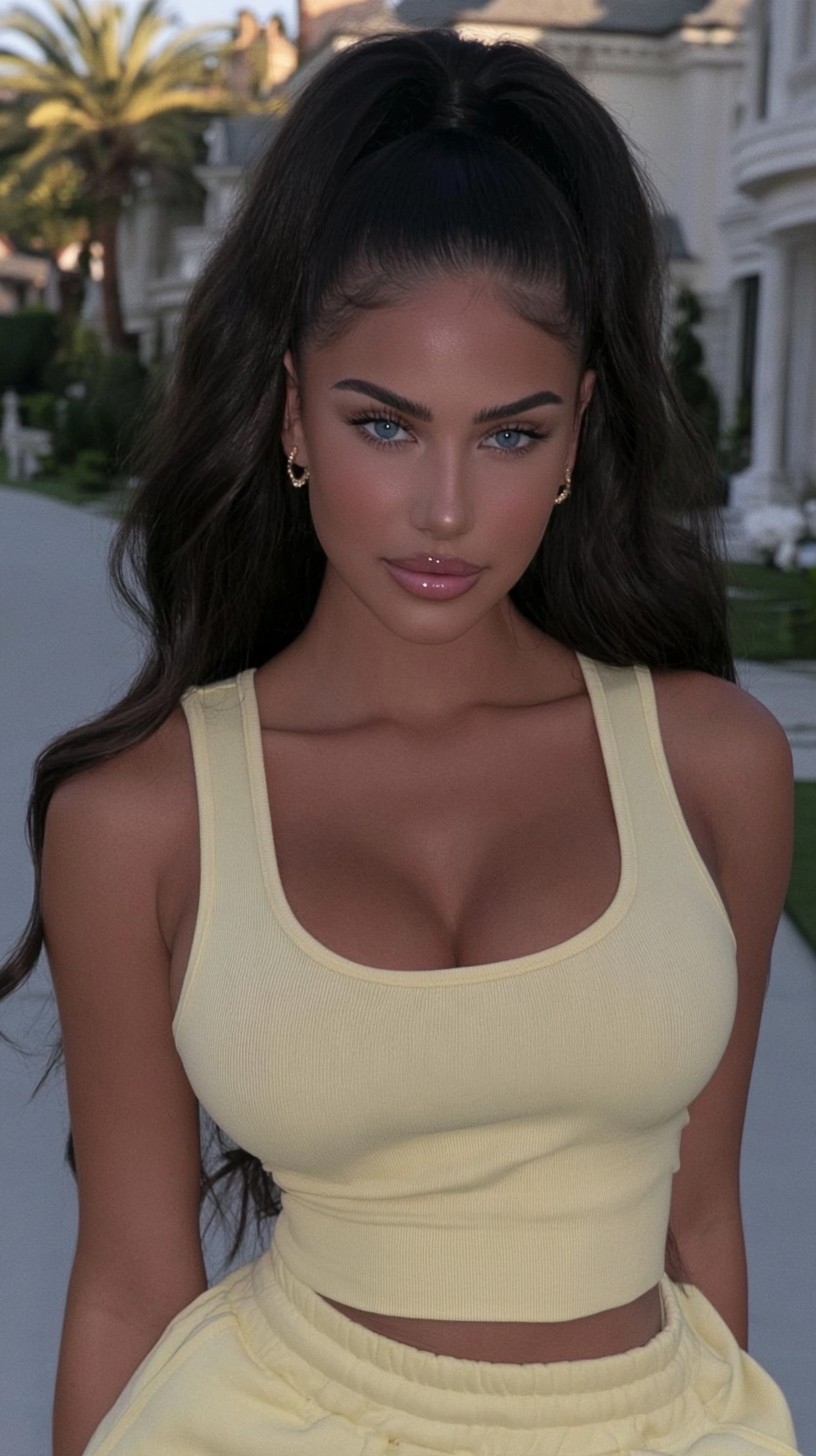 Original character reference
As you can see, she's wearing a light yellow outfit with her dark hair tied in a high ponytail.
Now, instead of going back to Midjourney and trying to generate the same girl wearing winter clothes in the mountains, I'm going to reuse this exact image!
For my new video, I want her wearing a caramel-brown winter outfit, chunky cream winter boots, and gold hoop earrings.
I also want her long hair completely down and loose, instead of tied up.
And I want her walking through a beautiful snowy mountain resort, with other people walking naturally in the background.
All I need to do is explain these changes to my Seedance 2.5 Prompt Builder.
Two Ways to Change Your Character's Outfit
You can simply tell your Prompt Builder what you want your character to wear.
For example:
"I want my character wearing a caramel-brown cropped hoodie, matching leggings, chunky cream winter boots, and gold hoop earrings."
You don't need an additional outfit reference image for this method!
If you have a specific outfit in mind and want Seedance to follow that style more closely, you can upload an additional reference image showing the clothing.
For this demonstration, I decided to use an outfit reference because I wanted a particular look.
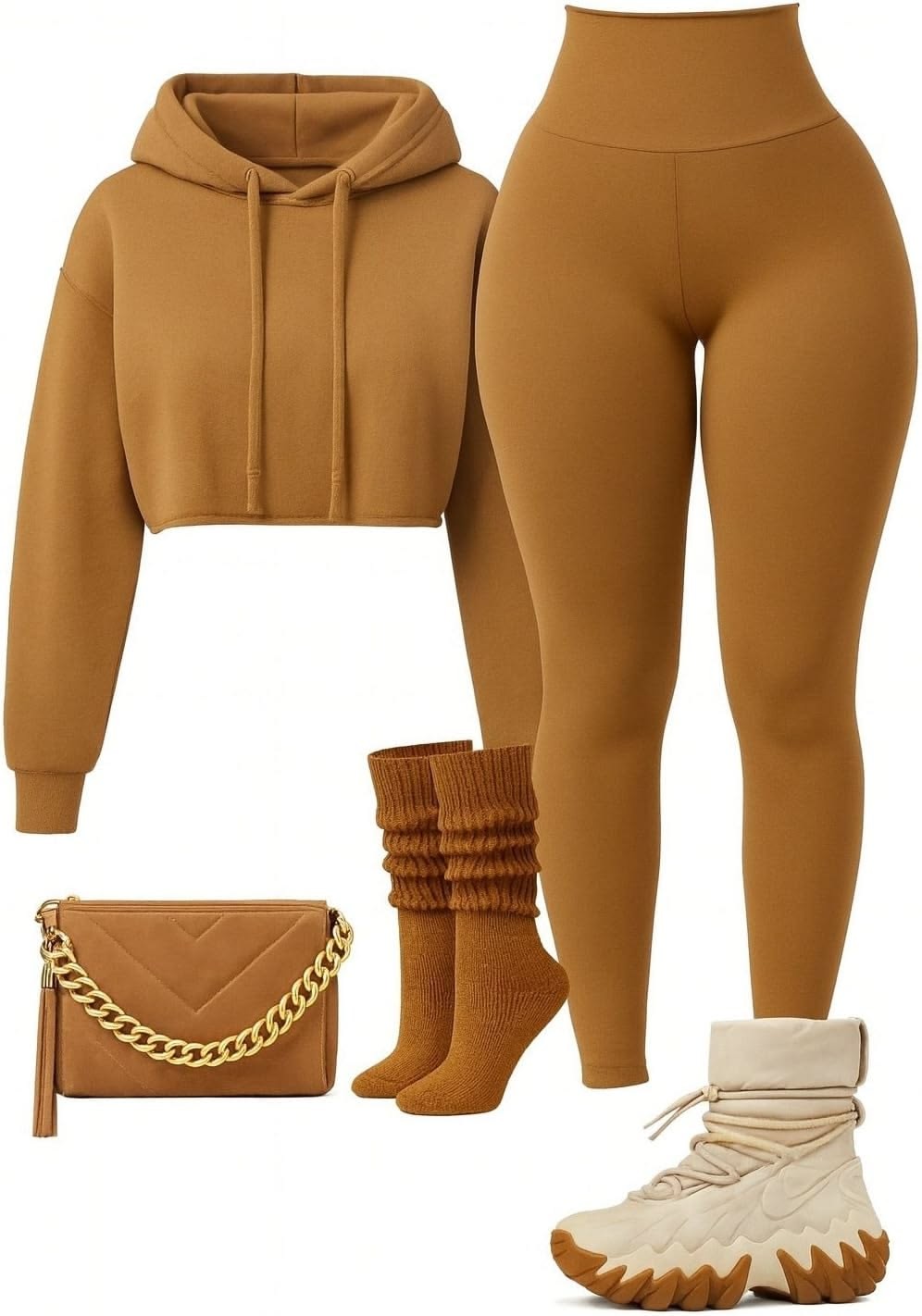 Outfit reference
When using multiple reference images, make sure you explain to your Prompt Builder what each one should control.
For my example:
- Reference Image 1: Preserve the woman's facial identity and recognizable features.
- Reference Image 2: Follow the outfit, colors, and clothing details.
I also explained that I wanted her hair down and that Seedance should not recreate the original background, pose, or clothing.
Here's the Exact Prompt I Used!
I asked my Seedance 2.5 Prompt Builder to create a seven-second cinematic video using my original character reference and the outfit reference.
Below is the exact prompt I used for this demonstration.
“make me a 7 second video prompt where this girl would wear this outfit and have her long voluminous hair down, add her some gold hoop earrings, and place her somewhere in the mountains walking while there is snow everywhere, there are people around but the focus is on her. I will use the outfit image as reference image”
You can use this as an example of how to give Seedance clear instructions when reusing an existing character.
Now, Look at These Two Results!
Here's where things get interesting!
First Generation
In my first generation, Seedance successfully changed her outfit and placed her in the snowy mountain resort.
However, even though my prompt specifically instructed Seedance to give her long, loose hair, it kept her original ponytail from the character reference.
Second Generation — Same Exact Prompt!
I decided to generate the video again.
And guess what?
I used the exact same prompt and the exact same reference images. I didn't change anything!
This time, Seedance followed my hairstyle instructions and generated the character with her hair down.
Same character. Same outfit. Same location. Same instructions.
But two slightly different results!
This is something really important to understand when working with AI video generation.
Even when you use the exact same prompt and reference images, the results won't necessarily be identical.
Sometimes Seedance follows every detail perfectly, and other times it might miss something.
So if your first generation doesn't look exactly how you imagined, it doesn't automatically mean your prompt is wrong.
Sometimes, simply generating again can give you a better result!
Of course, regenerating doesn't guarantee that every detail will be corrected, but it's worth trying before completely changing your workflow.
How to Use This in Your Own Mini Movies
For this demonstration, I created two short seven-second videos so you could clearly see how the same character reference can produce different results.
But you should apply this technique directly within the complete 30-second mini movie workflow I've already taught you.
You don't need to create separate short videos just to change your character's appearance.
Whenever you want to reuse an existing character in another mini movie, simply use their original Midjourney reference image.
Then tell your Seedance 2.5 Prompt Builder about your new story, the locations, the outfits, the actions, and any other details you want to change.
Make sure your prompt clearly explains which features should remain consistent and which elements should be different.
And if you want a very specific outfit, you can either describe it or provide an additional wardrobe reference image for better accuracy.
One Last Thing! ❤️
The most important thing I want you to take away from this lesson is that once you've created a character you love, you don't have to start from scratch in Midjourney every time you want to use them again.
You can reuse that same character reference across completely different videos and stories.
AI isn't always perfect, and you might occasionally need to regenerate or adjust your instructions.
But learning how to reuse your existing characters can save you so much time and make your creative process much easier.
One character. Endless stories. Endless possibilities. ❤️